
Mesa Upgrade

The Mesa upgrade is a major network upgrade (hard fork) for the Mina Protocol mainnet. It is not backward compatible: every consensus-participating Mina daemon (block producers, SNARK coordinators, archive nodes, Rosetta API nodes, and seed nodes) must run a Mesa-compatible release to remain on the network. Wallets, off-chain services, and downstream tooling do not run a daemon and only need to update if they pin to a specific transaction format or version.

New to the Mesa upgrade?

This documentation uses terms like automode, stop-slot, trustless upgrade, dispatcher, and more. If you encounter an unfamiliar term, check the Glossary for definitions.

What Mesa Introduces

Mesa bundles four Mina Improvement Proposals (MIPs) that change protocol behavior, plus two operational improvements to the upgrade flow itself. The canonical MIP specs live in the MinaProtocol/MIPs repository; each section below links to the spec for the proposal it describes.

Faster Blocks — MIP6

Mesa halves Mina's slot time from 180 seconds to 90 seconds, doubling block production frequency. To keep the long-term token emission rate flat, the per-block coinbase reward is also halved (from 720 MINA to 360 MINA). The total Mina supplied per epoch is unchanged.

Several second-order consequences flow from the slot-time change:

  • Epoch duration halves from ~14.9 days to ~7.4 days. Scripts and operational procedures tied to epoch boundaries (delegation cooldown, automated payouts, monitoring dashboards) trigger about twice as often.
  • Vesting schedules on active vesting accounts are automatically migrated during the hard fork so they continue unlocking on the same real-world cadence. No operator action is required.
  • SNARK coordinators handling maximum-cost zkApp transactions should deploy at least 4 workers (≈4 CPU cores each) to keep up with the new 90-second slot timing. A prerequisite SNARK-worker parallelization is delivered via soft fork before Mesa.

Expanded zkApp State — MIP7

Mesa raises the on-chain state available to a zkApp account from 8 field elements (indexes 0–7) to 32 field elements (indexes 0–31). zkApps can now store roughly four times more data directly on chain without off-chain workarounds.

Larger Events and Actions — MIP8

Mesa raises the per-transaction limit on events and actions from 100 field elements to 1024 field elements for each. The previous cap of 16 field elements per individual event or action is also removed. This makes events and actions a viable channel for richer on-chain signaling and larger off-chain dispatch payloads in a single transaction.

Mostly relevant to zkApp developers — node operators do not need to act on this change, but block producers will validate against the new limits automatically after the fork.

Larger zkApp Transactions — MIP9

Mesa roughly triples the maximum number of account updates a single zkApp transaction can contain. The previous weighted-cost formula (10.26·np + 10.08·n2 + 9.14·n1 < 69.45) is replaced with a simpler np + n2 + n1 ≤ 16 rule that admits any balanced binary proof tree of height 4.

This depends on the SNARK-worker parallelization shipped as a prerequisite for MIP6 — without it, processing maximum-size transactions inside a 90-second slot would not be feasible.

Automode Upgrades

For the first time in Mina's history, block producers can upgrade through a hard fork without manual intervention. The automode mechanism ships both the pre-fork and post-fork binaries in a single package, with a dispatcher that automatically transitions to the new chain when the fork activates. Archive node and Rosetta API operators still use manual mode — automode is not available for those node types. See Upgrade Modes for details.

Simplified Archive Upgrade

Unlike the Berkeley upgrade (which required up to 48 hours for archive database conversion), the Mesa archive upgrade is a fast schema upgrade that completes in under a minute. See Archive Upgrade.

Upgrade Flow — End-to-End Timeline

The Mesa upgrade follows four phases. The timeline below shows what happens at each stage, when it happens, and what you need to do.

Overview
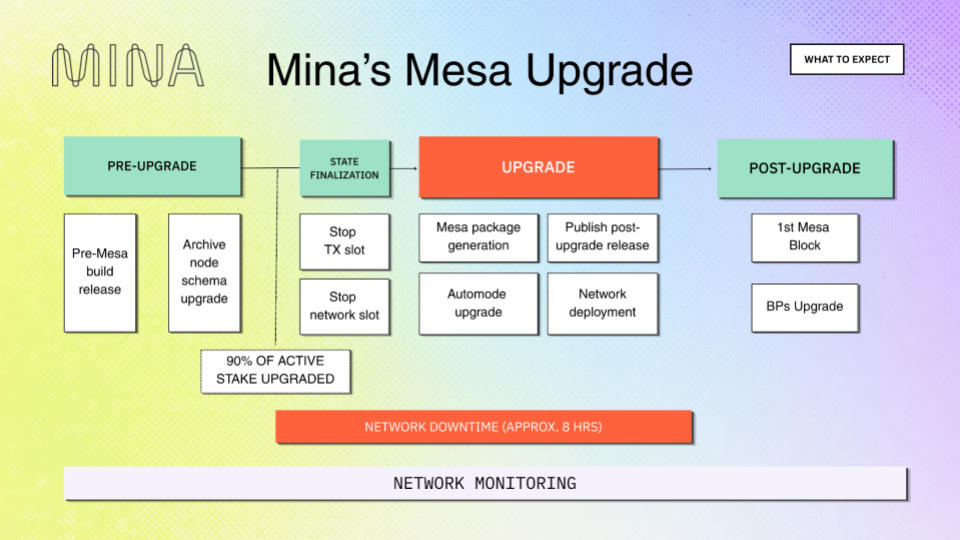
Mina's Mesa Upgrade — four-phase timeline from Pre-Upgrade through Post-Upgrade, with state finalization and network shutdown markers

The upgrade moves through four phases — Pre-Upgrade, State Finalization, Upgrade, and Post-Upgrade — anchored by three key moments:

MilestoneWhenWhat happens
stop-transaction-slotHours before the forkNetwork stops accepting new transactions
stop-network-slotExactly 5 hours after stop-transaction-slotBlock production halts entirely
Mesa genesis timestampExactly 3 hours after stop-network-slotFirst Mesa block is produced

Phase 1: Pre-Upgrade — weeks before the fork

Goal: Every participant is prepared and running the stop-slot release before the fork begins.

The table below is a high-level summary. The concrete install commands (Debian, Docker, etc.) and hardware requirements live in the Requirements and Upgrade Modes pages — start there once you know your role and deployment style.

ActorWhat to do
All operatorsVerify hardware requirements (32 GB RAM, 8-core CPU with AVX/BMI2). Back up keys.
Block ProducersChoose upgrade mode: automode (recommended) or manual. Install stop-slot release 3.x.x. If automode, install the mina-{network}-automode package — see Installing automode.
SNARK CoordinatorsA coordinator is a daemon node — follow the Block Producer path (automode or manual).
Standalone SNARK WorkersWorkers spawned by a coordinator (--run-snark-worker) need no separate action — they inherit the coordinator's binary. Workers run as a separate mina internal snark-worker process or container must be redeployed with the Mesa release after the fork.
Archive NodesInstall stop-slot release. Choose upgrade method: trustless (run upgrade script now) or trustful (import o1Labs dump later). If trustless, run the archive upgrade script — it is backward compatible and can be applied early.
ExchangesInstall stop-slot release. Update integrations (mina-signer, Rosetta API). Test on devnet. Plan deposit/withdrawal freeze window.
zkApp DevelopersUpdate to the Mesa-compatible o1js version (o1js@3.0.0-mesa.698ca for the preflight chain), recompile your contract, and verify it on the preflight network. Plan to redeploy on Mesa after the fork — every zkApp must be redeployed because the protocol version bump changes the verification key.
Readiness checklist

Review the Requirements and pick your Upgrade Mode before proceeding.


Phase 2: State Finalization — hours before the fork (exactly 5 hours)

Goal: The network reaches consensus on a final state. No new transactions are accepted.

At the predefined stop-transaction-slot, nodes stop accepting new user transactions. Block production continues for ~100 more slots with empty blocks (no coinbase, no fees) until the stop-network-slot to ensure all nodes converge on the same state. The concrete slot numbers and timestamps live on the Fork Schedule page.

ActorWhat to do
Block ProducersKeep your node running. Block density during finalization is critical. Do not stop your node.
SNARK WorkersKeep running. Continue producing SNARK work.
Archive NodesKeep the archive node running to capture all finalized blocks. If doing trustless upgrade, run the upgrade script now if you haven't already.
ExchangesDisable MINA deposits and withdrawals. Any transactions submitted after the stop-transaction-slot will not exist on the Mesa chain.
zkApp DevelopersNo action required. Monitor announcements.
For exchanges

Transactions submitted after the stop-transaction-slot will not carry over to the Mesa chain. Freeze all MINA activity before this point.


Phase 3: Upgrade — fork day (network is down)

Goal: The network halts, state is exported, and the Mesa release is published.

At the stop-network-slot, block production stops entirely. o1Labs exports the network state, builds the Mesa release with the final ledger baked in, and publishes packages and Docker images.

ActorWhat to do
Block Producers (automode)Nothing. Your node transitions to Mesa automatically. It will start producing blocks when the Mesa genesis timestamp arrives.
Block Producers (manual)Stop your node. Wait for the Mesa release announcement. Install the new package. Restart with updated flags.
SNARK CoordinatorsSame as block producers — automode transitions automatically, manual requires stop + install + restart.
Standalone SNARK WorkersCoordinator-spawned workers follow the coordinator automatically. Standalone workers (mina internal snark-worker process or container) must be stopped and redeployed with the Mesa binary; an older worker cannot submit work to a Mesa coordinator.
Archive NodesInstall the Mesa archive node release. Point it at your upgraded database (trustless) or import the o1Labs SQL dump into a fresh database (trustful).
ExchangesInstall the Mesa release. Keep deposits/withdrawals disabled until Mesa block production begins.

Phase 4: Post-Upgrade — after the fork

Goal: Block production resumes on the Mesa network. Normal operations return.

Exactly 3 hours after the stop-network-slot, at the predefined Mesa genesis timestamp, the first Mesa block is produced.

ActorWhat to do
Block ProducersVerify your node is on the Mesa chain (mina client status). If automode, check that the activated file exists in your config directory (see Troubleshooting). Monitor block production.
SNARK WorkersReconnect workers to the upgraded coordinator. Standalone workers must already be on the Mesa binary at this point. Verify SNARK work is being produced.
Archive NodesVerify the archive database is in sync. Run validation checks. Fix any missing blocks using archive tooling.
ExchangesRe-enable MINA deposits and withdrawals once block production is confirmed and your systems are verified.
zkApp DevelopersRedeploy every zkApp on Mesa — the protocol version bump invalidates Berkeley verification keys, so a redeploy is required before any zkApp can accept transactions. You can also take advantage of the expanded 32-field on-chain state at this point.

For step-by-step instructions per phase, see Upgrade Steps. For end-to-end walkthroughs by role (block producer, archive node, zkApp developer, exchange), see Examples.

Upgrade Modes

The Mesa upgrade supports two modes for daemon node operators: Automode (recommended — node handles the fork transition automatically) and Manual (operator stops the node, installs the Mesa release, and restarts).

See Upgrade Modes for the full comparison, requirements, and the persistent-filesystem / process-restart constraints that automode imposes. For low-level details on the dispatcher and dual-binary architecture, see Upgrade Modes — Details.

Examples

End-to-end walkthroughs of the four phases for different roles (block producer automode/manual, archive node, zkApp developer, exchange) live on the Examples page.

Quick Reference by Operator Type

Operator TypeKey Pages
Block ProducersRequirements, Upgrade Modes, Upgrade Steps, Post-Upgrade Flags
SNARK Workers / CoordinatorsRequirements, Upgrade Steps, Post-Upgrade Flags
Archive Node OperatorsRequirements, Archive Upgrade, Upgrade Steps, Post-Upgrade
Rosetta API OperatorsRequirements, Archive Upgrade, Upgrade Steps, Post-Upgrade
ExchangesRequirements, Upgrade Steps, Post-Upgrade, Archive Node Schema Changes

Network Details

The values below describe the current Mainnet (pre-fork) chain. They will change after the Mesa fork activates — the post-fork Chain ID, Git SHA-1, and node build link will be published in the Mesa release announcement.

Chain ID (Mainnet, pre-fork)
a7351abc7ddf2ea92d1b38cc8e636c271c1dfd2c081c637f62ebc2af34eb7cc1

Git SHA-1 (Mainnet, pre-fork)
ae112d3a96fe71b4ccccf3c54e7b7494db4898a4

Seed List
https://bootnodes.minaprotocol.com/networks/mainnet.txt

Node build
https://github.com/MinaProtocol/mina/releases?q=mesa