Upgrade Modes - Details
This page explains how the two upgrade modes work under the hood. If you just want to know which mode to pick and what to do, see Upgrade Modes. This page is for operators who want to understand the mechanism before trusting it with their nodes.
The Big Picture
During the Mesa hard fork, the network transitions from the current chain (referred to internally as "berkeley") to the new Mesa chain. Both upgrade modes use the same stop-slot mechanism to halt the old chain at a predetermined slot. The difference is what happens next:
- Automode: the node automatically switches to the Mesa binary and resumes. No operator action needed.
- Manual mode: the operator stops the old node, installs the Mesa release, and starts it themselves.
Both modes reach the same end state — a node running on the Mesa network, producing blocks after the Mesa genesis timestamp.
Stop-Slot Mechanism
Both modes rely on two critical slot numbers baked into the stop-slot release (3.x.x):
| Slot | What happens |
|---|---|
| stop-transaction-slot | The network stops accepting transactions. Blocks produced after this slot are empty — no user commands, no coinbase rewards, no fee transfers. This begins the State Finalization period. |
| stop-network-slot | The network stops producing and accepting blocks entirely. The chain halts. This is the point where the fork happens. |
The gap between these two slots is exactly 100 slots (5 hours) — the State Finalization period. It ensures all nodes converge on the same final state before the fork.
You will not earn block rewards during State Finalization (no coinbase), but you must keep your node running to maintain network stability and block density. If you are in the Delegation Program, uptime tracking continues during this phase.
Automode — How It Works Internally
Dual-Binary Architecture
The automode release ships two complete sets of Mina binaries plus the dispatcher in a single mina-{network}-automode Debian package:
| Component | Path | Purpose |
|---|---|---|
| Pre-fork binary | /usr/lib/mina/berkeley/mina | Runs the current chain up to the stop-network-slot |
| Post-fork binary | /usr/lib/mina/mesa/mina | Runs the Mesa chain after the fork |
Dispatcher (mina-dispatch) | /usr/local/bin/mina-dispatch | Routes your commands to the correct binary |
When you install the automode package (or use the automode Docker image), all three components are installed together.
The Dispatcher
The dispatcher (mina-dispatch) is a shell script that acts as a transparent wrapper around the real mina binary. When you run a mina command, the dispatcher decides which binary to execute:
daemonsubcommand — routes based on the activation state file:Does the activation state file exist?
→ NO: route to the pre-fork (berkeley) binary
→ YES: route to the post-fork (mesa) binaryclientsubcommand — always routes to the post-fork (mesa) binary, regardless of activation state. This works because the GraphQL schema did not change between Berkeley and Mesa.--version— passed through without processing.
The activation state file is located at {MINA_HARDFORK_STATE_DIR}/auto-fork-mesa-{network_id}/activated (e.g., ~/.mina-config/auto-fork-mesa-mainnet/activated on the host, or /root/.mina-config/auto-fork-mesa-mainnet/activated in Docker). This file is created by the daemon itself when it detects that the network has reached the stop-network-slot.
Dispatcher Limitations
This limitation exists because, for most subcommands, the dispatcher does not receive the config directory location as an argument. Without access to the config directory, it cannot check for the activated state file and therefore cannot determine whether the node is running Berkeley or Mesa.
The dispatcher supports the following subcommands:
| Subcommand | Routing behavior |
|---|---|
daemon | Routes to pre-fork or post-fork binary based on activation state |
client | Always routes to the post-fork (mesa) binary |
--version | Passed through without processing |
Any other subcommand (e.g., accounts list, ledger export) will fail with an error:
mina-dispatch ERROR: unsupported subcommand 'accounts' for automatic hardfork handling
For unsupported subcommands, invoke the correct version-specific binary directly:
| Binary | When to use | Path |
|---|---|---|
| Pre-fork (Berkeley) | Before the fork (or to query pre-fork state) | /usr/lib/mina/berkeley/mina |
| Post-fork (Mesa) | After the fork | /usr/lib/mina/mesa/mina |
# These work at any time — they bypass the dispatcher
/usr/lib/mina/berkeley/mina client status
/usr/lib/mina/mesa/mina accounts list
/usr/lib/mina/mesa/mina ledger export
client routingThe client subcommand (e.g., mina client status) is always routed to the mesa binary because it communicates with the running daemon over GraphQL, and the GraphQL schema did not change between Berkeley and Mesa. This means mina client status works through the dispatcher at any point — before or after the fork — as long as a daemon is running.
What the Dispatcher Does for daemon Commands
When the dispatcher routes a daemon command to the Mesa binary, it automatically adjusts your command-line arguments:
- Config files: Your existing
-config-filearguments are kept, and the Mesa-specific configuration is appended as the last-config-fileentry. This ensures Mesa settings take precedence. - Genesis ledger directory: Any
--genesis-ledger-dirargument is rewritten to point to the Mesa ledger directory. - Hardfork handling flag: The
--hardfork-handlingargument is removed (it is not supported on the Mesa chain).
Automode Timeline
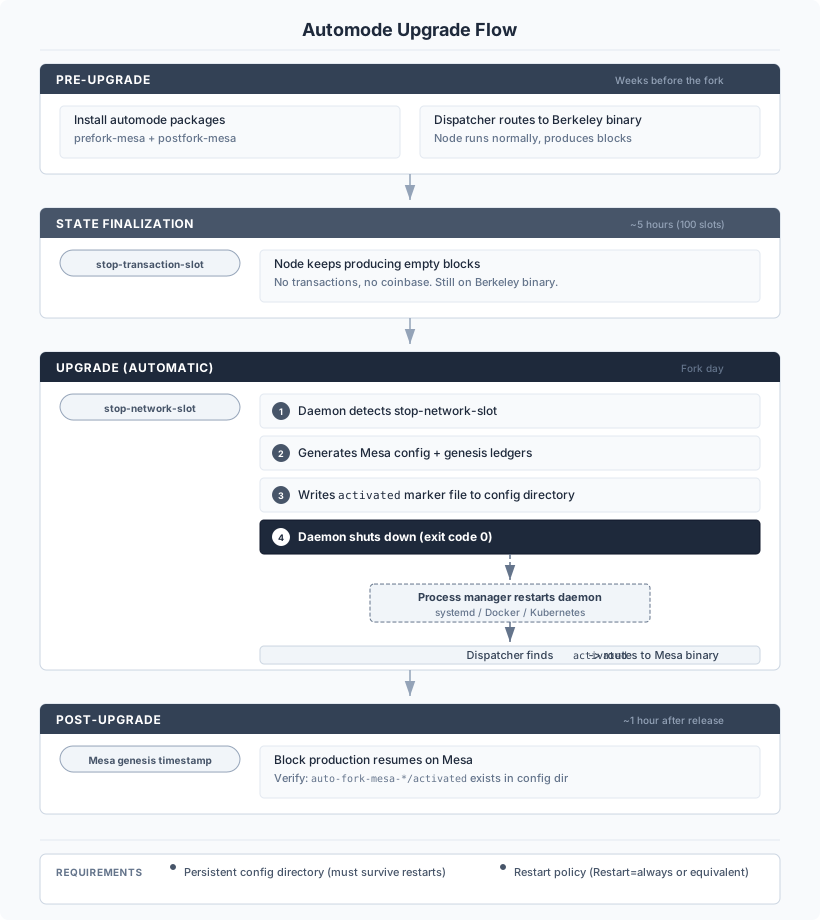
Here is what happens from a block producer's perspective when using automode:
Restart and Filesystem Requirements
The automode transition involves a process restart. When the daemon reaches the stop-network-slot, it:
- Generates the Mesa configuration (
daemon.json) and genesis ledger tarballs in the config directory - Writes an
activatedsentinel file to mark the fork as complete - Exits with code 0 (clean shutdown)
The daemon does not restart itself. Your process manager must detect the exit and restart the process. On restart, the dispatcher sees the activated file and launches the Mesa binary with the auto-generated config.
This means two things are critical:
Persistent config directory — The config directory (typically ~/.mina-config or /root/.mina-config in Docker) must survive across restarts. It contains the activated file and the generated Mesa configuration. If this directory is ephemeral or gets wiped on restart, the node will restart into the Berkeley binary and fail to join the Mesa network.
Automatic restart on clean exit — Your process manager must be configured to restart the daemon after exit code 0:
| Platform | Configuration | Notes |
|---|---|---|
| systemd | Restart=always | Default in the Mina systemd unit (mina.service). Restarts after 30 seconds. |
| Docker | --restart=always or --restart=unless-stopped | Set when creating the container. The default (no) will not restart. |
| Kubernetes | restartPolicy: Always | The k8s default for pods. Ensure your liveness probes and Helm chart configuration do not treat exit code 0 as a failure that triggers a volume wipe or full pod replacement. The config directory volume must be a PersistentVolumeClaim, not emptyDir. |
If your Helm chart or pod spec uses emptyDir for the config directory, the activated file and generated Mesa config will be lost when the pod restarts. Use a PersistentVolumeClaim instead. Also verify that your restart logic does not re-initialize the config directory from scratch — the auto-generated Mesa config must be preserved.
How automode is packaged
Operator install instructions (Debian packages, Docker image) live on Upgrade Modes — Installing automode. The detail worth keeping here is what each artifact contributes to the mechanism described above:
- The
mina-{network}-automodeDebian package is an umbrella package whose dependencies pull in the pre-fork binary, post-fork binary, dispatcher, and dispatcher configuration. Internally it depends onmina-{network}-prefork-mesa(supplies/usr/lib/mina/berkeley/mina) andmina-{network}-postfork-mesa(supplies/usr/lib/mina/mesa/mina, plus/usr/local/bin/mina-dispatchand/etc/default/mina-dispatch). Operators only need to installmina-{network}-automode; apt resolves the rest. - The
minaprotocol/mina-daemon-auto-hardforkDocker image bundles the same artifacts and setsMINA_APP=/usr/local/bin/mina-dispatchandMINA_HARDFORK_STATE_DIR=/root/.mina-configin the entrypoint.
The dispatcher reads its configuration from /etc/default/mina-dispatch. This file must exist and be owned by root. Do not modify it unless you know what you are doing.
Manual Mode — How It Works
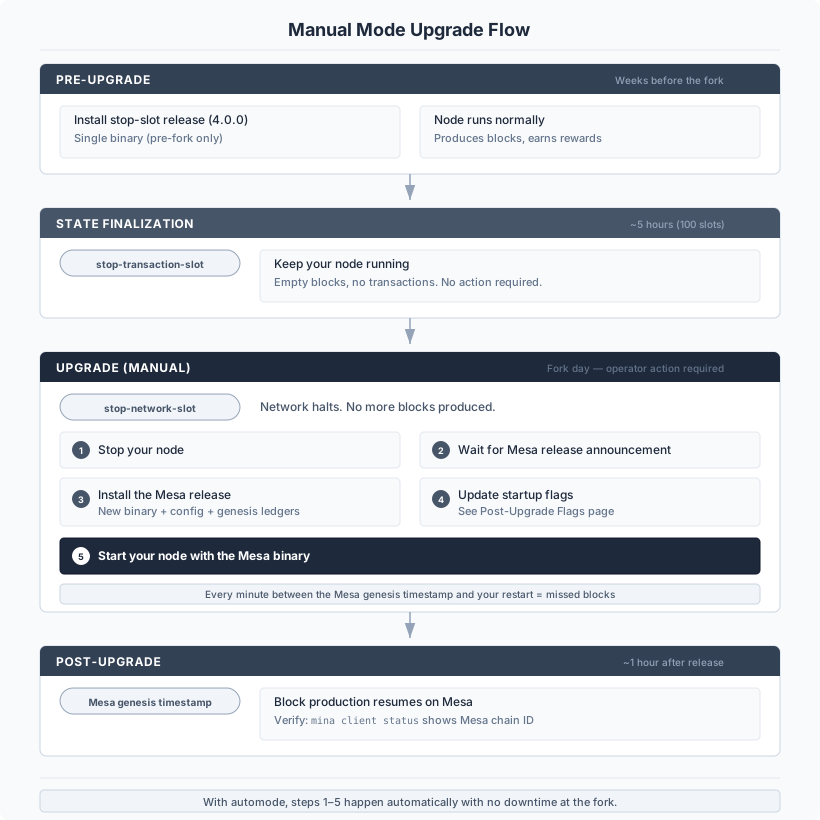
Manual mode is the traditional upgrade approach, similar to the Berkeley upgrade. You are in full control of every step.
Manual Mode Timeline
Manual Mode — What Gets Installed
When you install the Mesa release manually, the package includes:
- The Mesa
minabinary - A new runtime configuration JSON for the Mesa network
- New genesis and epoch ledger tarballs
These replace the pre-fork components. There is no dispatcher involved — you are running the Mesa binary directly.
Manual Mode — Updating Your Flags
When switching from the pre-fork to the Mesa binary, you need to update your startup flags:
- Remove
--hardfork-handlingif you were using it - Update your
--genesis-ledger-dirto point to the Mesa ledger directory (included in the package) - Update your
-config-fileto use the Mesa configuration - Keep your existing
--block-producer-key,--libp2p-keypair, and other operator-specific flags
See Post-Upgrade Flags for exact flag values.
Docker (Manual Mode)
For manual mode with Docker, use the hardfork image (not auto-hardfork):
minaprotocol/mina-daemon-hardfork:{version}-{codename}-{network}
This image includes both pre-fork and post-fork packages but uses a dedicated hardfork entrypoint that requires manual intervention to complete the transition.
Which mode should I pick?
The "who should use" criteria for each mode and the side-by-side comparison live on Upgrade Modes — this page intentionally stays focused on the underlying mechanism so the two documents do not drift.
Operator troubleshooting
Operator-facing troubleshooting (how to tell which binary is active, dispatcher debug mode, when to invoke the pre-fork vs post-fork binary by its full path) has moved to its own page: Troubleshooting.